
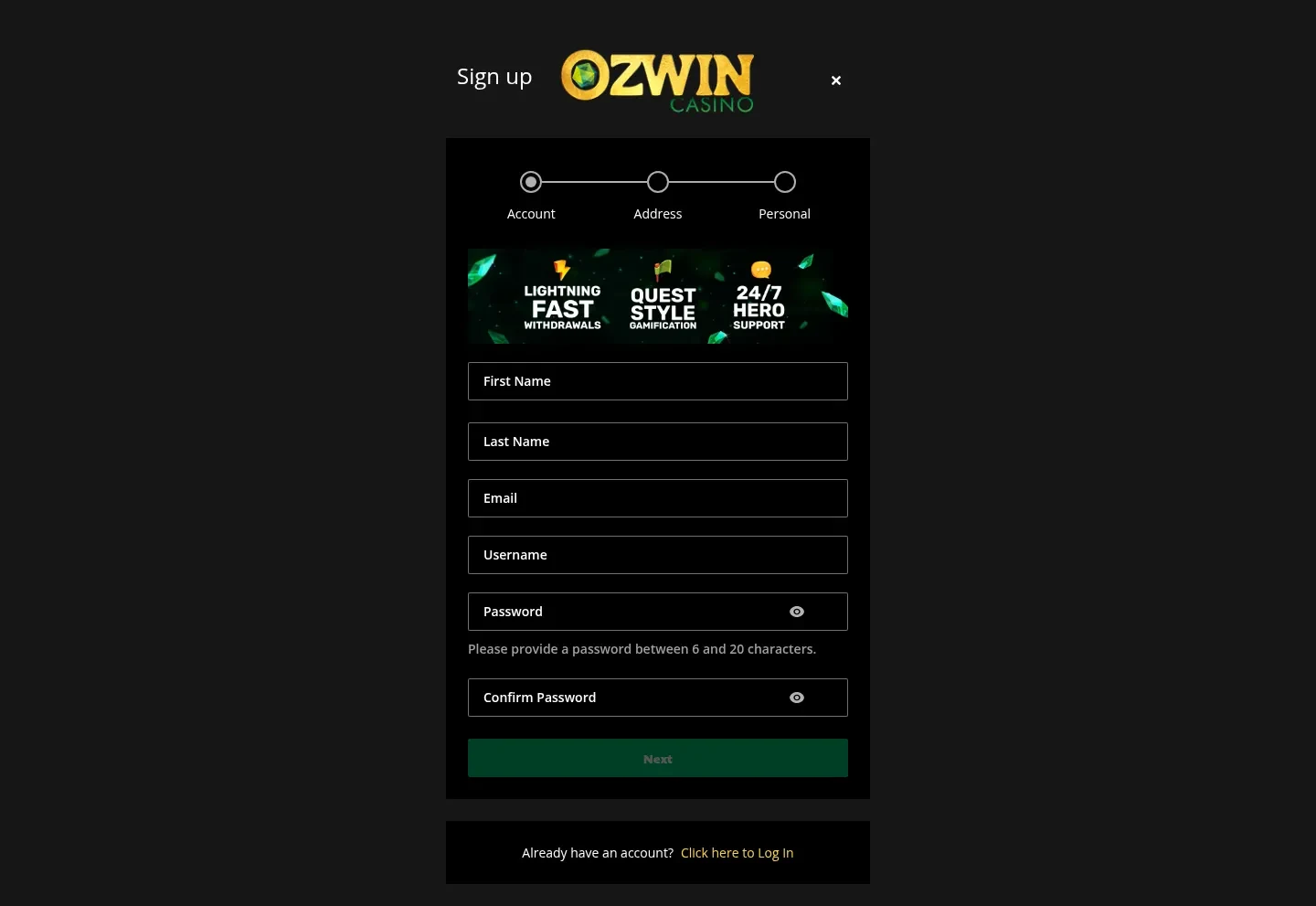
The three-step Ozwin sign-up form
Sign Up on www.ozwincasino.com opens signup.ozwincasino.com. A bar at the top of that form names three steps: Account, Address and Personal. A side banner on the same screen mentions lightning-fast withdrawals, quest-style gamification and 24/7 hero support — marketing lines, not cashier limits.
You must be 18 or over. If you already have an account, the line under the form, “Already have an account? Click here to Log In”, sends you to the Log In card.
ozwinvip.com is not the Sign Up host and cannot create an Ozwin account for you.
Account details on the first step
The Account step asks for the fields below.
- Open Sign Up from www.ozwincasino.com, or go directly to signup.ozwincasino.com.
- Type First Name and Last Name.
- Type Email.
- Choose a Username. This is the value the later Log In card asks for, not the email.
- Create a Password between 6 and 20 characters, then fill Confirm Password.
- Tap Next.
A promo-code field is not on this step. If you want the welcome package, keep OZWELCOME-B and OZWELCOME-C. If you want the no-deposit credit, keep OZWELCOME-A. Redeem those codes on Promotions or inside the account after the form is finished.
After Next: Address and Personal
Address and Personal are the second and third steps on the same bar. Fill what Ozwin asks for on those steps, using details that will match a later ID check.
If the Account step will not continue
If Next is rejected, look at the password length first: the form itself asks for 6–20 characters. Then check that the two password fields match and that the email is typed correctly. You must be 18 or over, or the age of majority in your jurisdiction if that is higher, to finish Sign Up.
The username chosen on this step is what the later Log In card asks for, so note it before you leave the form. If you already have an account, use the Log In link under the form rather than starting a new Sign Up.
First deposit and the welcome codes
Once the account is open, banking is in Australian dollars. Lightning Bitcoin starts at A$5. Neosurf and eZeeWallet start at A$10. Cards, JetBank Transfer, Apple Pay and Google Pay start at A$20. The two-deposit welcome still uses a A$20 floor unless the current terms say otherwise. The method table is on Ozwin deposits and withdrawals.
The 400% package and the 100 free spins are explained on the welcome page. The A$10 credit is on the no-deposit page. Neither offer is applied automatically from these pages.
Method choice on the first deposit is worth a pause. Lightning Bitcoin starts at A$5, which is useful if you only want to open the cashier, but a match bonus still uses the A$20 floor unless the terms say otherwise. JetBank Transfer is marked for Australia only, takes an amount in EUR and credits AUD, with no fee on that card. Cash App starts at A$25 and carries an 8.5% deposit fee. Apple Pay and Google Pay sit at A$20, with a note to check the Deposit section if they are available.
| Method | Minimum deposit | Note |
|---|---|---|
| Lightning Bitcoin | A$5 | Lowest published floor |
| Neosurf, eZeeWallet | A$10 | |
| Visa, Mastercard, JetBank Transfer, Apple Pay & Google Pay | A$20 | JetBank is marked for Australia only; Apple Pay and Google Pay may need a check in the Deposit section |
| Cash App, Bitcoin, Ether | A$25 | Cash App carries an 8.5% fee |
The full table, payout windows and the 15% fee on a deposit not turned over once are on payments.
The username you pick on the Account step is the value the later Log In card asks for. If you forget it, the Forgot Password or Username? link on that card is the published path, not the inbox of this desk. The email from the form is still needed for Ozwin support, so type it carefully. You must be 18 or over to finish Sign Up; the age line is also in the footer of the Ozwin site.
Documents Ozwin can request later
Before a withdrawal, Ozwin asks for a valid photo ID and a recent utility bill in the player’s name. Payment-method documents and source of funds can also be requested. Verification is described as required when you want to withdraw, especially on the first payout. An incomplete check can hold a withdrawal.
Name and address on the form should match those documents. A payout is made to the method used to deposit, in the name on the account. Tools for a deposit limit or a self-exclusion sit on Pause tools and help lines.
Questions on Ozwin registration
How do I register at Ozwin?
Open Sign Up, complete Account with name, email, username and a 6–20 character password, then continue through Address and Personal. The walk-through is on this page.
Where do I enter an Ozwin promo code?
Not on the first Account step. Keep OZWELCOME-A, OZWELCOME-B or OZWELCOME-C and look for the redeem path on Promotions or in the account.
What happens after I register?
You can sign in with the username and password, then fund the wallet from the payments page if you want the welcome match or a later withdrawal.
What documents can Ozwin ask for?
A valid photo ID and a recent utility bill in your name, especially before the first payout. Payment-method documents and source of funds can also be requested.
Where the product is tight
- Address and Personal follow the Account step.
- There is no promo-code box on the first Sign Up step.
- A first withdrawal is held until documents are accepted.
- The minimum payout is A$100, which is already above the A$10 no-deposit credit.
Pause tools and help lines
Ozwin is for people aged 18 or over. Daily or monthly deposit limits are set through support. Self-exclusion runs from one week to permanent, with a review before the account can be opened again. Help lines Ozwin names are Gamblers Anonymous, Gambling Help Online and Gambling Therapy. A longer note is on Pause tools and help lines.